PRD-15 · CONSTRUCTION
Plan to Bill
Quantity take-off and costing from a DXF floor plan
Overview
Open the plan. Read the bill.
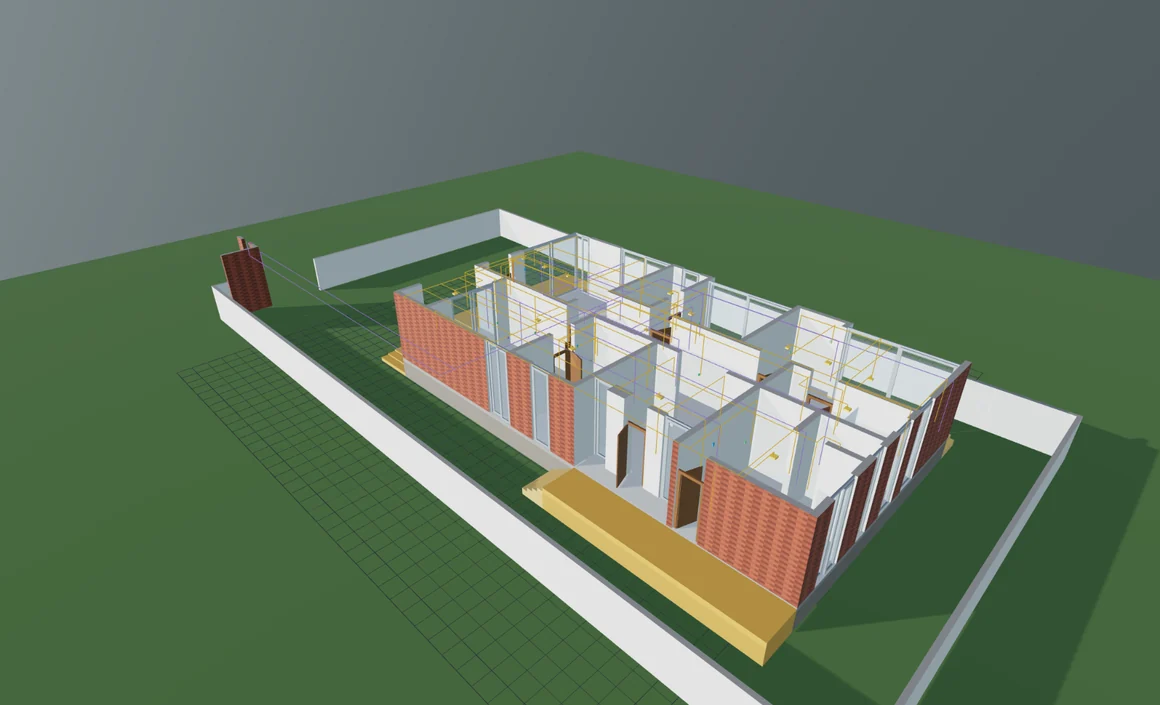
A take-off takes a day, and then the plan changes. Areas get scaled off a print, typed into a spreadsheet and added up by hand; the arithmetic is sound and the inputs are a week old. Plan to Bill reads the DXF you were sent, you say which lines are walls - the layer names usually say it for you - and it closes the rooms, cuts the openings, stands the model up and measures it. Services are laid out from what each room is for. Rates are applied on the server. Move one tag and the floor area, the masonry, the paint, the conduit and the bill all recompute, because there is only ever one model.
What it does
Inside the system.
RED
It reads the drawing you were sent
Lines, polylines, arcs, circles, splines and nested blocks, reduced to point sequences so nothing downstream special-cases a curve. Layer names are read, not ignored: a layer called Mu-0.20 or WALL 230 carries its own thickness. Where the header lies about units, the layer names are believed and the disagreement is flagged. Several drawings laid out in one file are found and boxed, and the boxes drag by their corners when the guess is wrong.
BLD
It stands the plan up
Tagged lines are offset into wall bands, unioned and extruded; doorways close to find the rooms a person would count, and reopen so you can walk through them. Openings are cut with CSG at the sizes on the drawing. Storeys stack, each able to bring its own sheet. Roof, stairs, false ceilings, sunken slabs and the structural frame are part of the same model, and the compound wall is built off the site rather than the plinth, at its own height.
QTY
Every number shows its working
Floor area, wall area, volume, ceiling, masonry, plaster, paint and flooring, measured per room off the geometry - never from a dimension written on the drawing. Each room also reports how much of its own boundary was actually walled, so a figure the tool had to infer looks different from one it measured.
SVC
Five services, laid out from the rooms
Say what each room is for and electrical, plumbing, data and security, fire and garden watering follow: points placed, chased to a room board, each board run back to the distribution board. Clash detection runs over shared routes with a clearance table per trade pair, because the right clearance between power and waste is not the right clearance between duct and power.
BIL
From quantities to a bill
Quantities go to the server as a page of areas, volumes and counts - no coordinates, no geometry - and come back priced. Composite rates split into labour and material, sequence into a programme with a cash flow, and resolve into a week-by-week crew by trade. Out comes a bill of quantities, a material schedule and a programme, as XLSX, CSV or PDF.
STD
It names a standard without claiming to meet it
Nothing here measures to a named standard, and saying otherwise would be the one lie this tool exists not to tell. The report states which conventions were used, what was deducted and what was not, in enough detail that a quantity surveyor can set it beside their own method. Where an edition names CPWD or IS 1200, it also says it has not been checked clause by clause against it.
Under the hood
Engineering depth.
What makes the numbers worth arguing with: where each one came from, and what the tool will not claim.
PRV
Provenance on every figure
A quantity carries the sheet, the layers and the entities it was measured from, and the share of the answer each contributed. A services layout states its confidence out loud and separates what was counted from what was proposed: the count is a fact, the route is the tool's, so the length is a proposal and says so.
EDN
Two editions from one build
Design adds the walkthrough, furniture, daylight study, solar layout and IFC4 export. Contractor adds revision comparison, CPWD as the named standard, coordination-grade services routing and confidence required on every line. A disabled module leaves the bundle entirely rather than hiding behind a flag.
REG
Priced for the market you build in
Twenty markets across South Asia, the Gulf, South-East Asia and Africa, each with its own currency, digit grouping and cost index, and seven planning authorities with their own setbacks, ground coverage and height rules. Only India's rates come from a survey; the rest are scaled from it and say so on screen and in the export.
PRI
The drawing never leaves the browser
Parsing, building and measuring all happen on the machine the file is opened on. There is no upload step and no copy of your client's drawing on somebody else's disk. Signed out, the tool still opens a plan, builds it, measures it and walks through it, keeping projects in that browser.
Deployment
Where it runs.
Any modern browser, with nothing to install. Accounts are optional: signed out, a plan opens, builds, measures and walks, and projects stay in the browser. The cost estimate and the cooling load are worked out on a Go service with a PostgreSQL database, because the rates and the heat transfer coefficients are the judgement in the product - so those two need an account, and the panels say so.
Frequently asked
Straight answers.
What is Plan to Bill?
Plan to Bill is construction take-off and estimating software from Varuni Systems. It opens an architect's DXF floor plan in the browser, builds a measured 3D model from the lines you tag as walls, lays out electrical, plumbing, data, fire and irrigation services, and prices the result as a bill of quantities. The drawing is parsed, built and measured on your own machine.
Can I get a bill of quantities from a DXF file?
Yes. Plan to Bill measures floor area, wall area, volume, masonry, plaster, paint and flooring per room off a DXF floor plan's own geometry, then prices them into a bill of quantities you can export as XLSX, CSV or PDF. You tag which lines are walls once - the layer names usually propose it - and everything downstream follows from that.
Is there software that measures quantities from a CAD drawing?
Yes. Plan to Bill is a browser-based quantity take-off tool for DXF drawings. It reads lines, polylines, arcs, circles, splines and nested blocks, reads wall thickness out of layer names where the drafter put it there, and measures rooms off the drawing's geometry rather than from dimensions written on it.
Does my drawing get uploaded to a server?
No. The DXF is parsed, built and measured in your browser and never leaves the machine it is opened on. Only pricing happens on the server, and what is sent for that is a page of areas, volumes and counts with no coordinates and no geometry in it.
How accurate is an automated quantity take-off?
It depends on the drawing, and Plan to Bill says so rather than hiding it. Every room reports how much of its own boundary was genuinely walled as against closed by inference, and the services layout states its confidence and separates the counts it trusts from the route lengths it proposed. A figure the tool was unsure of is marked as such instead of looking like all the others.
Does Plan to Bill measure to CPWD or IS 1200?
It names the standard without claiming to meet it. The report states the conventions it used and what was deducted - every opening comes off wall area however small, and nothing comes off masonry volume but the columns and beams standing in it - so a quantity surveyor can set it beside their own method. Where an edition names CPWD or IS 1200 it also states that it has not been checked clause by clause against it, and that the standard governs where the two differ. This is an estimate measured off a drawing, not a certified take-off.
Which building services can Plan to Bill lay out?
Electrical, plumbing, data and security, fire, and garden watering, with air conditioning loads alongside them. Points are placed from what each room is for, chased to a room board and run back to the distribution board. Where two trades share a route, clash detection applies a clearance table per trade pair rather than one number for everything.
Which countries can Plan to Bill price a building for?
Twenty markets across South Asia, the Gulf, South-East Asia and Africa, each with its own currency, digit grouping and cost index, plus seven Indian planning authorities with their own setback, ground coverage and height rules. Only India's rates come from a survey; the other nineteen are scaled from it and are labelled as inferred on screen and in the export.
What can I export from Plan to Bill?
The bill of quantities, the material schedule and the programme as XLSX, CSV or PDF, the report as a PDF with its measurement basis and caveats printed on it, and the model itself as IFC4 for whoever downstream works in BIM. IFC export ships in the Design edition.
What is the difference between the Design and Contractor editions?
Both measure, route services, detect clashes, programme the work and produce a bill of quantities. Design adds the walkthrough, furniture, daylight study, solar layout and IFC export. Contractor adds revision comparison between two issues of a drawing, CPWD as the named measurement standard, coordination-grade services routing and confidence required on every line.
Start here
See Plan to Bill
against your problem.
Tell us what you're trying to train, track or communicate through and we'll tell you honestly whether Plan to Bill fits - or whether you need something else built.
Start the conversation